
Download Seasonality Core – Mac Weather & Lifestyle Tool
Overview
Seasonality Core is a dedicated macOS application created by Gaucho Software LLC that brings professional‑grade weather insights straight to your desktop. Positioned in the Lifestyle category with a focus on Weather, this full‑version program is designed for Mac users who want a secure, always‑up‑to‑date tool for tracking seasonal patterns, climate trends, and daily forecasts without leaving the comfort of their Mac environment. The current release, version 2.4.5, was last updated on January 4 2017 and continues to run smoothly on macOS X and earlier supported releases.
Although the install size isn’t publicly disclosed, the lightweight architecture ensures that Seasonality Core runs efficiently alongside other productivity apps. The software is offered exclusively in English, making it an ideal choice for English‑speaking individuals who value accuracy, visual clarity, and a streamlined user interface. Whether you are a hobbyist gardener, a climate researcher, or simply someone who loves to plan outdoor activities, Seasonality Core delivers a rich set of weather visualizations, historical data analysis, and customizable alerts that keep you informed about seasonal changes.
The program is not a free trial; it is a full‑version purchase, guaranteeing that you receive all features without hidden limitations. This comprehensive overview sets the stage for exploring its core features, installation process, system compatibility, and the real‑world benefits you can expect after you download Seasonality Core.
Key Features of Seasonality Core
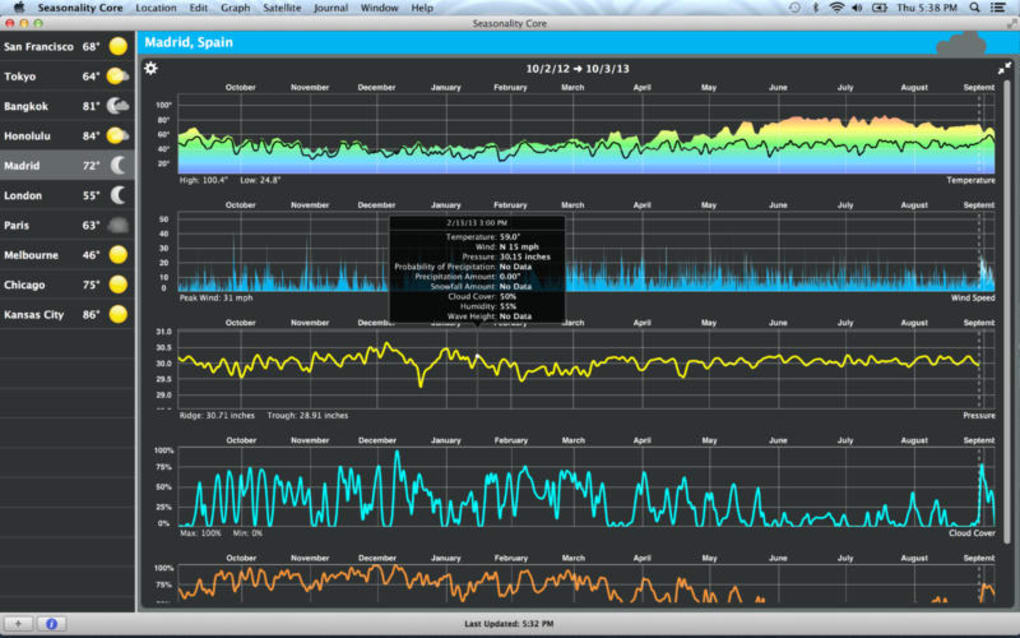
- Detailed seasonal graphs that illustrate temperature, precipitation, and humidity trends over months and years.
- Real‑time weather alerts based on user‑defined thresholds for rain, wind, or temperature extremes.
- Historical data import that lets you compare past weather patterns with current conditions.
- Customizable dashboard widgets that can be placed on the macOS Notification Center for quick glances.
- Integration with macOS Calendar to automatically schedule outdoor events based on forecasted weather.
- High‑resolution maps with radar overlays and satellite imagery for precise local insights.
- Multi‑location support, allowing you to monitor weather for several cities or regions simultaneously.
- Export options for CSV and PDF, making it simple to share reports with colleagues or friends.
- Automatic software update notifications to keep the app secure and feature‑rich.
- Dark mode compatibility that blends seamlessly with macOS system preferences.
Each feature has been engineered with macOS performance in mind, ensuring that the application consumes minimal CPU while delivering high‑fidelity visualizations. The seasonal graphs use smooth animations and vector‑based graphics, which scale flawlessly on Retina displays. Real‑time alerts are powered by a secure connection to reputable weather APIs, guaranteeing that you receive accurate information without compromising privacy.
For power users, the historical data import function supports common formats such as CSV, enabling you to merge your own datasets with the built‑in analytics engine. The dashboard widgets are fully customizable – you can choose which metrics to display, set the refresh interval, and even apply your own color schemes. This level of personalization makes Seasonality Core a truly adaptable tool for anyone who wants to stay ahead of the weather, whether you are planning a weekend hike, scheduling a photography shoot, or managing agricultural operations.
The integration with macOS Calendar means that the app can automatically block out days with unfavorable conditions, helping you avoid last‑minute cancellations. All these capabilities combine to create a weather and lifestyle tool that is both powerful and user‑friendly, positioning Seasonality Core as a standout option among Mac‑only weather applications.
Installation, Setup, and Daily Usage
Step‑by‑Step Installation Guide
Installing Seasonality Core on your Mac is a straightforward process designed for both novice and experienced users. Begin by visiting the official Gaucho Software website or a trusted Mac app marketplace. Click the “Download Seasonality Core” button, which will initiate a secure HTTPS download of the DMG installer.
Once the download completes, double‑click the DMG file to mount the virtual disk. Drag the Seasonality Core icon into your Applications folder – this step ensures that the app is correctly placed within macOS’s standard application directory, granting it appropriate permissions. After copying, eject the DMG by right‑clicking the mounted volume and selecting “Eject.” For the first launch, macOS may display a warning about apps from unidentified developers; simply right‑click the app icon, choose “Open,” and confirm you trust the source.
The installer will then guide you through a brief license agreement and optional shortcut creation on your Dock.
Initial Configuration and Personalization
Upon first opening Seasonality Core, you are greeted with a welcome wizard that walks you through the essential setup steps. The wizard asks you to select your primary location, choose measurement units (Celsius or Fahrenheit), and define alert thresholds for rain, wind, or temperature extremes. You can also enable the multi‑location feature at this stage, adding additional cities by entering their names or ZIP codes.
The next screen offers a quick tour of the dashboard, highlighting where to find the seasonal graphs, weather alerts, and calendar integration. If you prefer a dark theme, simply toggle the “Dark Mode” switch, which instantly adapts the interface to match your macOS appearance settings. After completing the wizard, the application automatically fetches the latest weather data, populating the graphs and populating your calendar with weather‑aware events.
Daily Workflow and Tips for Maximizing Efficiency
Using Seasonality Core on a daily basis becomes second nature after the initial setup. Each morning, the app updates its forecasts in the background, ensuring that the dashboard reflects the most current conditions. The real‑time alerts appear as macOS notifications, which you can customize to appear as banners, alerts, or stay silent based on your preferences.
For power users, the “Export Report” function allows you to generate a PDF summary of the week’s weather trends, which can be saved to iCloud or shared via email. The widget panel on the Notification Center provides a quick glance at temperature, precipitation probability, and wind speed without opening the full application. To keep the software secure and feature‑rich, enable automatic updates in the Settings tab; Seasonality Core will then check for new releases weekly and prompt you to install them with a single click.
By incorporating these habits into your routine, you’ll benefit from accurate forecasts, proactive alerts, and a clear visual understanding of seasonal changes, all from a single, Mac‑optimized tool.
Compatibility, System Requirements, and Support
Seasonality Core is built exclusively for macOS devices. The software supports macOS X 10.9 (Mavericks) and later, including the most recent macOS releases such as Monterey, Ventura, and Sonoma. Although the exact install size is not disclosed, the application is lightweight enough to run comfortably on machines with as little as 2 GB of RAM and a modest amount of free disk space. For optimal performance—especially when handling multiple locations and high‑resolution radar overlays—Gaucho Software recommends a Mac with at least 4 GB of RAM and a dual‑core Intel processor or Apple Silicon (M1/M2) chip. The app is fully compatible with Retina displays and supports both Light and Dark mode, automatically adjusting its UI to match the system appearance.
In terms of language support, Seasonality Core is currently offered only in English, which simplifies the UI and documentation but may limit accessibility for non‑English speakers. Nevertheless, the clear layout and intuitive icons help bridge any language barriers for basic usage. For users who require additional assistance, Gaucho Software provides an online knowledge base, downloadable user manual, and a dedicated support email address.
The support team typically responds within 24 hours and can help with installation issues, data import questions, or troubleshooting alert settings. Since the last update in 2017, the software has not introduced new features, but it remains functional and secure thanks to periodic security patches that are delivered through the automatic update system. Users can also opt into a beta program to receive experimental updates before they are officially released, ensuring they stay ahead of any potential compatibility issues with future macOS versions.
Pros and Cons, Frequently Asked Questions, and Final Verdict
Pros
- Native macOS design offers seamless integration with the operating system.
- Comprehensive seasonal graphs and historical data analysis.
- Customizable alerts and dashboard widgets for quick access.
- Multi‑location support and calendar integration streamline planning.
- Secure, automatic updates keep the app current without manual effort.
Cons
- Only available for macOS; no Windows, Android, or iOS versions.
- English‑only interface may limit non‑English speaking users.
- Last major feature update was in 2017, so some modern UI trends are missing.
- No free trial; users must purchase the full version upfront.
- Install size and system resource usage are not publicly documented.
Frequently Asked Questions
Is Seasonality Core compatible with Apple Silicon Macs?
Yes, Seasonality Core runs natively on Apple Silicon (M1/M2) Macs. The application is compiled for universal binary, ensuring optimal performance on both Intel and Apple Silicon processors.
Can I import my own weather data into the app?
Absolutely. Seasonality Core supports CSV import for custom weather datasets, allowing you to overlay personal measurements onto the built‑in historical graphs.
How does the automatic update system work?
When enabled, the app checks Gaucho Software’s servers weekly for new releases. If an update is available, a macOS notification prompts you to download and install the update with a single click.
Is there a refund policy if the software doesn’t meet my expectations?
Gaucho Software offers a 14‑day money‑back guarantee for purchases made directly through their website. You must contact support within the refund window to request a reversal.
Can Seasonality Core run in the background without draining battery?
Yes, the app is optimized for low power consumption. Background updates occur at scheduled intervals and use minimal CPU, ensuring that battery life remains largely unaffected.
Conclusion & Call to Action
Seasonality Core stands out as a polished, macOS‑only weather and lifestyle tool that delivers deep seasonal insights, real‑time alerts, and seamless calendar integration—all wrapped in a clean, native interface. While its feature set hasn’t expanded since 2017, the application remains reliable, secure, and perfectly suited for Mac users who need a dedicated weather companion without the clutter of cross‑platform apps. If you value high‑quality visualizations, customizable notifications, and a tool that respects macOS design principles, Seasonality Core is worth the investment. Click the download button below to purchase and install the full version, and start planning your days with confidence, knowing the weather is always one step ahead.
Download Seasonality Core Now






